How do I customise the menu HTML?
Mega Menu Builder comes with an out-of-the-box responsive template. You can customise this, or even provide your own set of styles.
Customise with CSS
If you wish to create your own implementation of a Mega Menu, you can use Mega Menu Builder for menu management and then create your own styles.
When adding the widget with Page Builder, choose No theme. This outputs the menu without app styles and does not hide your default navigation.
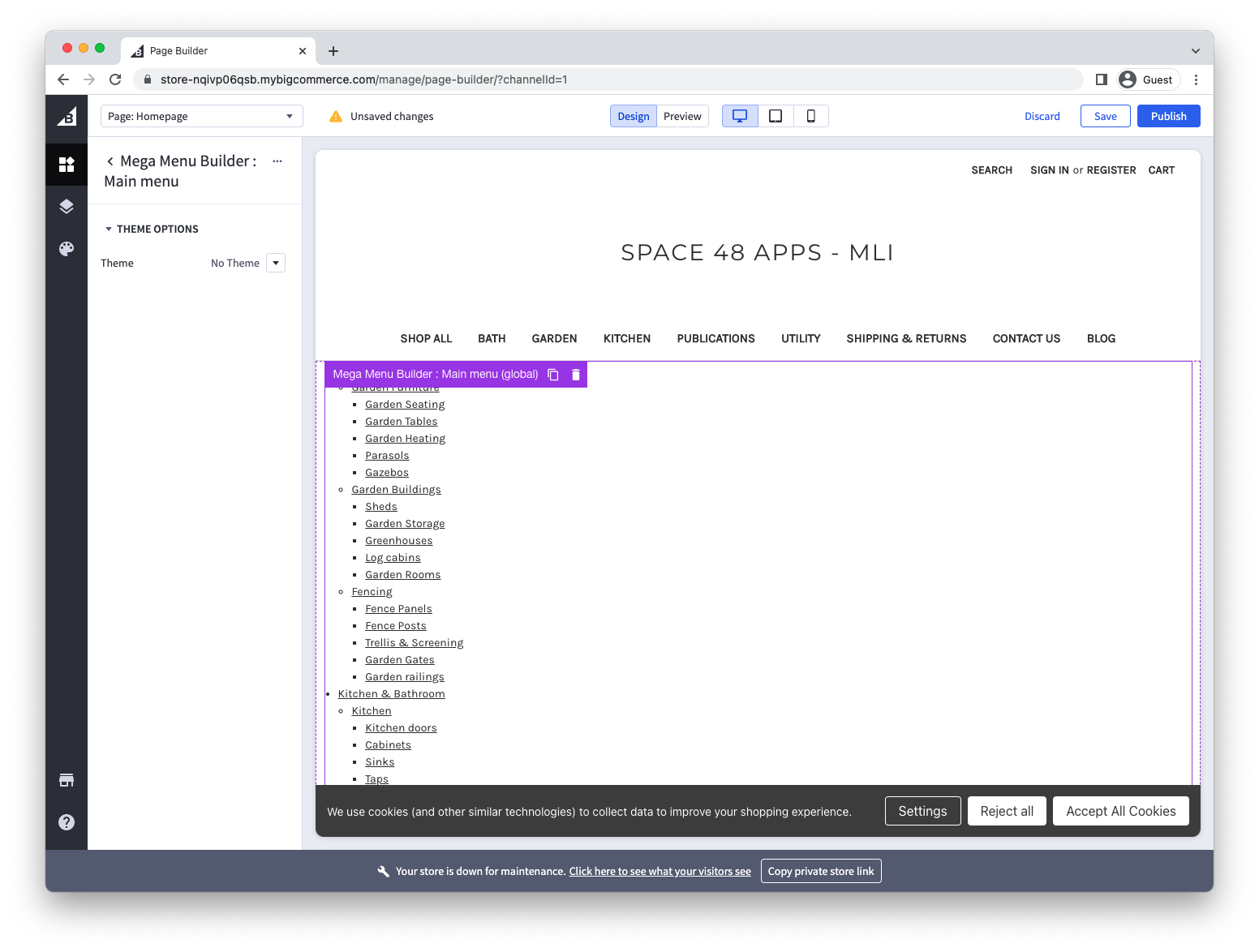
We provide succinct but descriptive semantic HTML so that you can achieve almost any type of mega menu you like without having to modify the HTML.
The generated HTML uses implementation identifiers such as s48meganav and data-space48-menu. Keep these identifiers because the storefront JavaScript and CSS depend on them. Example output:
<div class="s48meganav megamenu-visible">
  <span class="menu-back-btn">Back</span>
  <nav class="menu-block nav nav--responsive" data-space48-menu="main-menu">
    <ul class="menu-block__depth-0">
      <li class="menu-block--item menu-block__depth-0--item menu-block__tag- has-children"
        data-url="/kitchen-and-bathroom.html">
        <a href="/kitchen-and-bathroom.html" title="Kitchen & Bathroom"
          class="menu-block--link menu-block__depth-0--link">
          <span class="menu_block--heading menu_block__depth-0--heading">Kitchen & Bathroom</span>
        </a>
        <div class="menu-block--wrapper menu-block__depth-1--wrapper">
          <ul class="menu-block__depth-1">
            <li class="menu-block--item menu-block__depth-1--item menu-block__tag- has-children"
              data-url="/kitchen.html">
              <a href="/kitchen.html" title="Kitchen" class="menu-block--link menu-block__depth-1--link">
                <img src="/content/fitted-kitchens-_be64c3ea1e16c124c43626aca6da3be0f6d13213.webp"
                  class="menu-block--image menu-block__depth-1--image" alt="Kitchen">
                <span class="menu_block--heading menu_block__depth-1--heading">Kitchen</span>
              </a>
              <div class="menu-block--wrapper menu-block__depth-2--wrapper">
                <ul class="menu-block__depth-2">
                  <li class="menu-block--item menu-block__depth-2--item menu-block__tag- has-no-children"
                    data-url="/kitchen-doors.html">
                    <a href="/kitchen-doors.html" title="Kitchen doors"
                      class="menu-block--link menu-block__depth-2--link">
                      <span class="menu_block--heading menu_block__depth-2--heading">Kitchen doors</span>
                    </a>
                  </li>
                  <li class="menu-block--item menu-block__depth-2--item menu-block__tag- has-no-children"
                    data-url="/kitchen-cabinets.html">
                    <a href="/kitchen-cabinets.html" title="Cabinets"
                      class="menu-block--link menu-block__depth-2--link">
                      <span class="menu_block--heading menu_block__depth-2--heading">Cabinets</span>
                    </a>
                  </li>
                  <li class="menu-block--item menu-block__depth-2--item menu-block__tag- has-no-children"
                    data-url="/sinks.html">
                    <a href="/sinks.html" title="Sinks" class="menu-block--link menu-block__depth-2--link">
                      <span class="menu_block--heading menu_block__depth-2--heading">Sinks</span>
                    </a>
                  </li>
                  <li class="menu-block--item menu-block__depth-2--item menu-block__tag- has-no-children"
                    data-url="/taps.html">
                    <a href="/taps.html" title="Taps" class="menu-block--link menu-block__depth-2--link">
                      <span class="menu_block--heading menu_block__depth-2--heading">Taps</span>
                    </a>
                  </li>
                </ul>
              </div>
            </li>
            <li class="menu-block--item menu-block__depth-1--item menu-block__tag- has-children"
              data-url="/kitchen-worktops.html">
              <a href="/kitchen-worktops.html" title="Kitchen worktops"
                class="menu-block--link menu-block__depth-1--link">
                <img src="/content/solid-wood-worktops_5653efd305e7cedbb13eab76f44c11a8fc21ecba.webp"
                  class="menu-block--image menu-block__depth-1--image" alt="Kitchen worktops">
                <span class="menu_block--heading menu_block__depth-1--heading">Kitchen worktops</span>
              </a>
              <div class="menu-block--wrapper menu-block__depth-2--wrapper">
                <ul class="menu-block__depth-2">
                  <li class="menu-block--item menu-block__depth-2--item menu-block__tag- has-no-children"
                    data-url="/splashbacks.html">
                    <a href="/splashbacks.html" title="Splashbacks" class="menu-block--link menu-block__depth-2--link">
                      <span class="menu_block--heading menu_block__depth-2--heading">Splashbacks</span>
                    </a>
                  </li>
                  <li class="menu-block--item menu-block__depth-2--item menu-block__tag- has-no-children"
                    data-url="/laminate-worktops.html">
                    <a href="/laminate-worktops.html" title="Laminate Worktops"
                      class="menu-block--link menu-block__depth-2--link">
                      <span class="menu_block--heading menu_block__depth-2--heading">Laminate Worktops</span>
                    </a>
                  </li>
                  <li class="menu-block--item menu-block__depth-2--item menu-block__tag- has-no-children"
                    data-url="/solid-wood-worktops.html">
                    <a href="/solid-wood-worktops.html" title="Solid Wood Worktops"
                      class="menu-block--link menu-block__depth-2--link">
                      <span class="menu_block--heading menu_block__depth-2--heading">Solid Wood Worktops</span>
                    </a>
                  </li>
                  <li class="menu-block--item menu-block__depth-2--item menu-block__tag- has-no-children"
                    data-url="/acrylic-worktops.html">
                    <a href="/acrylic-worktops.html" title="Acrylic Worktops"
                      class="menu-block--link menu-block__depth-2--link">
                      <span class="menu_block--heading menu_block__depth-2--heading">Acrylic Worktops</span>
                    </a>
                  </li>
                </ul>
              </div>
            </li>
            <li class="menu-block--item menu-block__depth-1--item menu-block__tag- has-children"
              data-url="/kitchen-appliances.html">
              <a href="/kitchen-appliances.html" title="Appliances" class="menu-block--link menu-block__depth-1--link">
                <img src="/content/kitchen-appliances_591d768e238f85e27922452f1c656d9bec1da49d.webp"
                  class="menu-block--image menu-block__depth-1--image" alt="Kitchen appliances">
                <span class="menu_block--heading menu_block__depth-1--heading">Appliances</span>
              </a>
              <div class="menu-block--wrapper menu-block__depth-2--wrapper">
                <ul class="menu-block__depth-2">
                  <li class="menu-block--item menu-block__depth-2--item menu-block__tag- has-no-children"
                    data-url="/washing-machines.html">
                    <a href="/washing-machines.html" title="Washing Machines"
                      class="menu-block--link menu-block__depth-2--link">
                      <span class="menu_block--heading menu_block__depth-2--heading">Washing Machines</span>
                    </a>
                  </li>
                  <li class="menu-block--item menu-block__depth-2--item menu-block__tag- has-no-children"
                    data-url="/dishwashers.html">
                    <a href="/dishwashers.html" title="Dishwashers" class="menu-block--link menu-block__depth-2--link">
                      <span class="menu_block--heading menu_block__depth-2--heading">Dishwashers</span>
                    </a>
                  </li>
                  <li class="menu-block--item menu-block__depth-2--item menu-block__tag- has-no-children"
                    data-url="/kitchen/ovens.html">
                    <a href="/kitchen/ovens.html" title="Ovens" class="menu-block--link menu-block__depth-2--link">
                      <span class="menu_block--heading menu_block__depth-2--heading">Ovens</span>
                    </a>
                  </li>
                  <li class="menu-block--item menu-block__depth-2--item menu-block__tag- has-no-children"
                    data-url="/hobs.html">
                    <a href="/hobs.html" title="Hobs" class="menu-block--link menu-block__depth-2--link">
                      <span class="menu_block--heading menu_block__depth-2--heading">Hobs</span>
                    </a>
                  </li>
                  <li class="menu-block--item menu-block__depth-2--item menu-block__tag- has-no-children"
                    data-url="/fridges.html">
                    <a href="/fridges.html" title="Fridges" class="menu-block--link menu-block__depth-2--link">
                      <span class="menu_block--heading menu_block__depth-2--heading">Fridges</span>
                    </a>
                  </li>
                </ul>
              </div>
            </li>
          </ul>
        </div>
      </li>
      <li class="menu-block--item menu-block__depth-0--item menu-block__tag- has-no-children"
        data-url="/painting-and-decorating.html">
        <a href="/painting-and-decorating.html" title="Painting & Decorating"
          class="menu-block--link menu-block__depth-0--link">
          <span class="menu_block--heading menu_block__depth-0--heading">Painting & Decorating</span>
        </a>
      </li>
    </ul>
  </nav>
</div><br />
Render your own HTML
CSS is the simplest way to customise the standard output. For an advanced implementation, you can fetch the menu metafields and render your own HTML.
Each time a menu is updated, multiple channel metafields are updated with the menu item data.
Menus have to be stored across multiple metafields so that large menus do not hit the metafield character limit.
Metafields are stored in the space48-mega-menu-builder-$name namespace, where $name is the hyphenated version of your menu name. For example, if your menu was called "Main menu" the metafields would be stored within the space48-mega-menu-builder-main-menu namespace.
GraphQL query
To fetch the metafields using the storefront GraphQL API, the query would look like this:
query metafields {
  channel {
    metafields(namespace: "space48-mega-menu-builder-main-menu") {
      edges {
        node {
          key
          id
          value
        }
      }
    }
  }
}
The metafield namespace is space48-mega-menu-builder- followed by a lowercase, hyphenated menu name. For example, Main menu uses space48-mega-menu-builder-main-menu. This is a live implementation identifier and must not be renamed.
Combining the metafields
The menu is split across multiple metafields. The first metafield will include the top level menu items. Then, for each top level menu item that has children, the "tree" of menu items beneath it will be stored in a separate field.
In terms of naming conventions, the top-level menu items will be stored in a metafield with a key that matches your menu name (with spaces replaced with hyphens). For example, a menu called "Main Menu", the first metafield will have namespace space48-mega-menu-builder-main-menu and key main-menu.
If a top-level menu item has children menu items, they will be stored in a separate metafield. The key is based on the menu name with a unique ID suffix. The ID is the id property of the parent top-level menu item.
So, to rebuild the menu from a list of metafields, the pseudo-code would be:
<ul>
  {for each menu items from the top level metafield}
      <li>{menu item}
          {if has children, loop through metafields to find metafield where key matches menu item id}
              {render children menu items}
      </li>
</ul>
In a stencil template, the logic would look something like this:
Widget
If you're using a stencil theme, we recommend using a widget, even a custom one, as it's the easiest way to ensure that the navigation can be placed on every page without making modifications to multiple templates.
This is our widget template for reference. It uses handlebars partials to reduce the duplicate code required between sections.
When creating a widget, include the GraphQL query in its storefront_api_query field.